Permissions
When the active Claude or Codex agent needs to write a file or run a command, a permission card appears inline in the conversation asking you to Allow, Deny, or Always Allow. Always Allow adds the tool to a per-vault allowlist so you’re never asked again for that tool. You can also resolve permissions directly from the Agents List without switching threads.
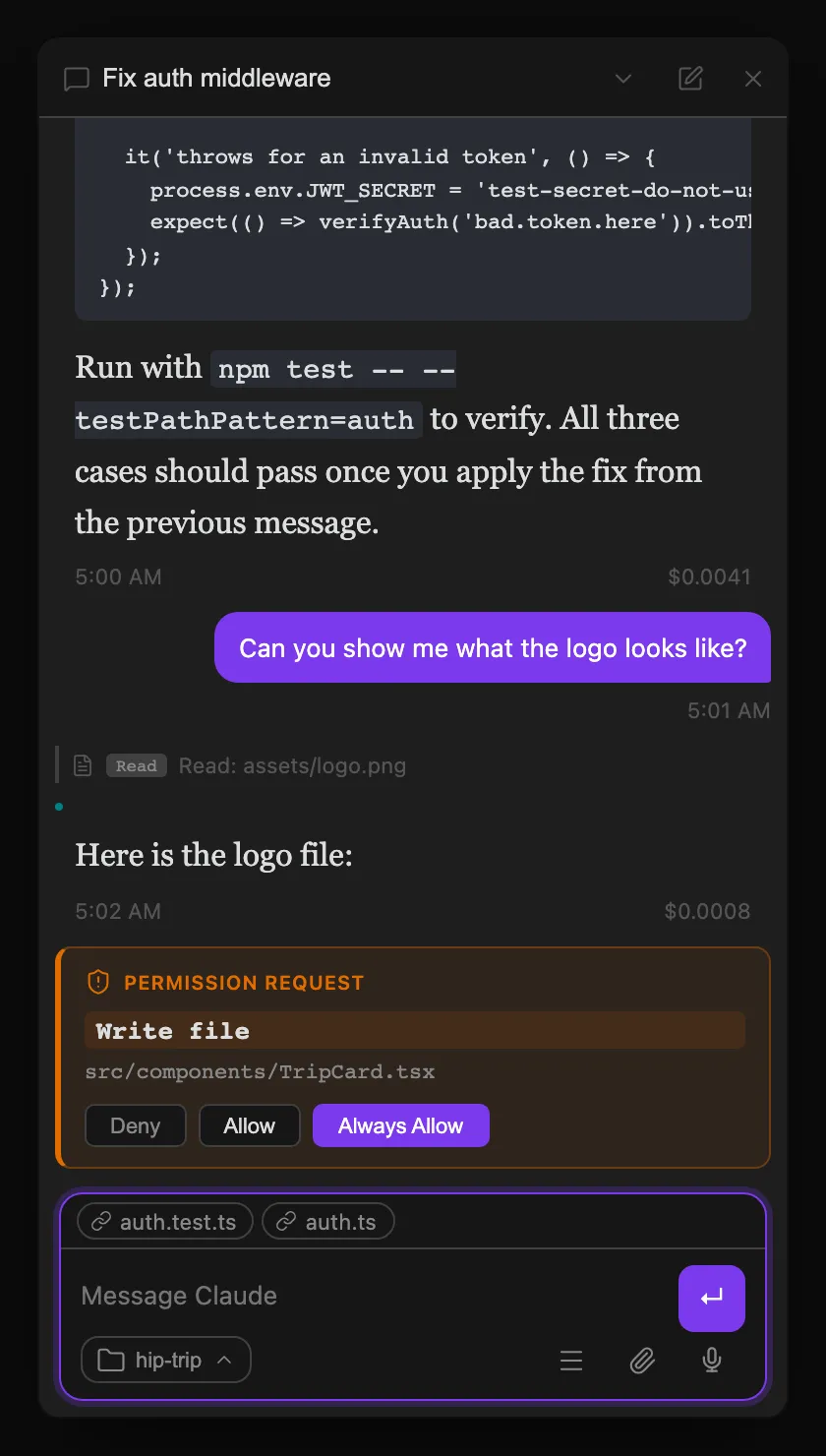
The default behavior can be changed globally in Settings → Tools → Permission Mode, or per-thread via the shield (🛡) button in the thread footer — a thread-level override takes precedence over the global setting and is useful when you want Plan Mode for one specific task without affecting other threads.
| Mode | Behavior |
|---|---|
default | Use the selected harness’s default permission behavior |
acceptEdits | Automatically accept file edits; prompt for commands and other tools |
bypassPermissions | Skip all permission prompts — the agent executes everything without asking |
plan | The selected harness proposes a written plan before taking any action; you approve, edit, or reject it before it proceeds — see Plan Mode below |
dontAsk | Suppress all interactive permission dialogs; the agent proceeds without confirmation. Intended for scheduled/background sessions that run unattended |
auto | The agent autonomously decides when to prompt vs. proceed based on action risk |
Note for scheduled sessions. Threads created by the built-in scheduler automatically use
dontAskso cron jobs never stall waiting for a permission dialog that nobody is watching. They also inherit any external MCP servers configured under Settings → MCP (Compass, Helio, or any other user-configured HTTP/SSE/stdio server) alongside the plugin’s built-in tools, so scheduled agents have the same tool surface as an interactive session —${VAR_NAME}placeholders in that config are resolved from environment variables and keychain-stored secrets, and a server with an unresolved placeholder is skipped for that run rather than started with a blank credential.
Auto-denied tool calls. In
autoanddontAskmode — or when a deny rule blocks a tool — a tool call can be denied without an interactive prompt. When that happens the conversation shows a distinct “Auto-denied <tool>” annotation, with the deciding reason (e.g.ruleormode), so the denial stays visible instead of only surfacing as a failed tool result.
Plan Mode
Set Permission Mode → plan globally in Settings, or use the shield button in the thread footer to set it for a single thread. Claude and Codex can then investigate without mutating files or external state until they produce a plan for your approval. Read-only commands and other non-mutating research are still available.
Codex can also call its no-argument EnterPlanMode control when a task needs investigation before implementation. The current turn hands off at a safe boundary, then Agent Threads starts one fresh native Codex Plan collaboration turn under a read-only sandbox. Claude provides the equivalent transition through its native plan-mode capability.
The flow:
- You send a message as normal.
- A “Planning…” visual state appears while the active agent gathers context without making changes.
- When the agent returns its native structured plan, the existing inline approval card replaces the spinner and shows the full proposed plan text.
- You pick one of three actions on the card:
- Approve — the thread switches back to Default mode before starting one fresh implementation turn.
- Edit — the plan text becomes editable in-place; submitting it switches to Default mode and starts the implementation turn with your revised plan.
- Reject — the thread stays in or returns to Plan mode and makes no edits. Your queued or new feedback is used for the next revision; if there is no feedback, the agent is asked to revise the plan.
Plan Mode is useful for risky or large-scale tasks where you want to review the approach before any files are touched.
Agent questions
When Claude or Codex needs your input before it can continue, Agent Threads shows a persisted question card inline in the conversation. This is the same flow for Claude’s AskUserQuestion and Codex app-server item/tool/requestUserInput requests: the card remains available until you answer it, including after switching threads or reloading the workspace.
Claude questions can offer single-select or multi-select choices plus an Other response. Codex questions preserve their stable IDs and can offer a single-select choice list, Other or free-text input, and masked secret input. Codex questions are always single-select; the plugin does not infer multi-select behavior that Codex did not request.
Codex question cards work natively in Plan mode. In Default mode, they are enabled when the Codex app server advertises default_mode_request_user_input. Older Codex versions remain safe to use, but a Default-mode question may fall back to a prose request instead of an inline card. Update the Codex CLI for the complete experience.
Agent questions are separate from permission cards, which authorize tool actions, and from MCP Elicitation, which collects information requested by an MCP server. Questions asked by a child agent still belong to the owning thread and do not add direct-control capabilities to the Native Agent Workspace.
MCP Elicitation
Some MCP servers need a credential or a form filled before they can proceed — for example, an OAuth flow or a confirmation dialog. When this happens, Agent Threads renders an elicitation card inline in the conversation rather than silently failing.
- URL auth card — displays a clickable link for the OAuth URL. Click it to open the auth page in Obsidian’s Web Viewer (or your system browser), complete the flow, then return to the thread. Claude resumes automatically once the server receives the credential.
- Form card — renders input fields derived from the server’s JSON schema (text fields, selects, checkboxes). Fill in the form and submit; the response is forwarded to the MCP server and the session continues.
Without elicitation support the session would stall indefinitely with no visible feedback. The card makes the situation visible and actionable without leaving Obsidian.